HStudy: Points Only Count After a Parent Approves
HStudy is a family study app I built. It does not teach anything and it does not generate exercises. What it manages is the verbal contract between a parent and a child — "finish it and you get the points" — by giving that contract a paper trail. The child checks in, the parent approves, the points post. In that order, and on the record. Android and iOS share one Kotlin codebase, the interface switches between Chinese and English at runtime, and the data stays on the device.
It is at v3.3.1, free, with no in-app purchases. The source is on GitHub and the builds are on the v3.3.1 release page. What follows covers the problems it targets, what each module owns, why the points ledger is built the way it is, and the technical trade-offs behind it — then the places install goes wrong and what the analytics actually sends.
What HStudy actually is
HStudy puts a parent role and a child role on the same device, or across two paired devices. The parent side is configuration: create tasks, build schedules, define rewards, approve points. The child side is execution: check in, focus, log mistakes, spend points. Both sides read the same local database. There is no cloud account and no dependency on a network connection.
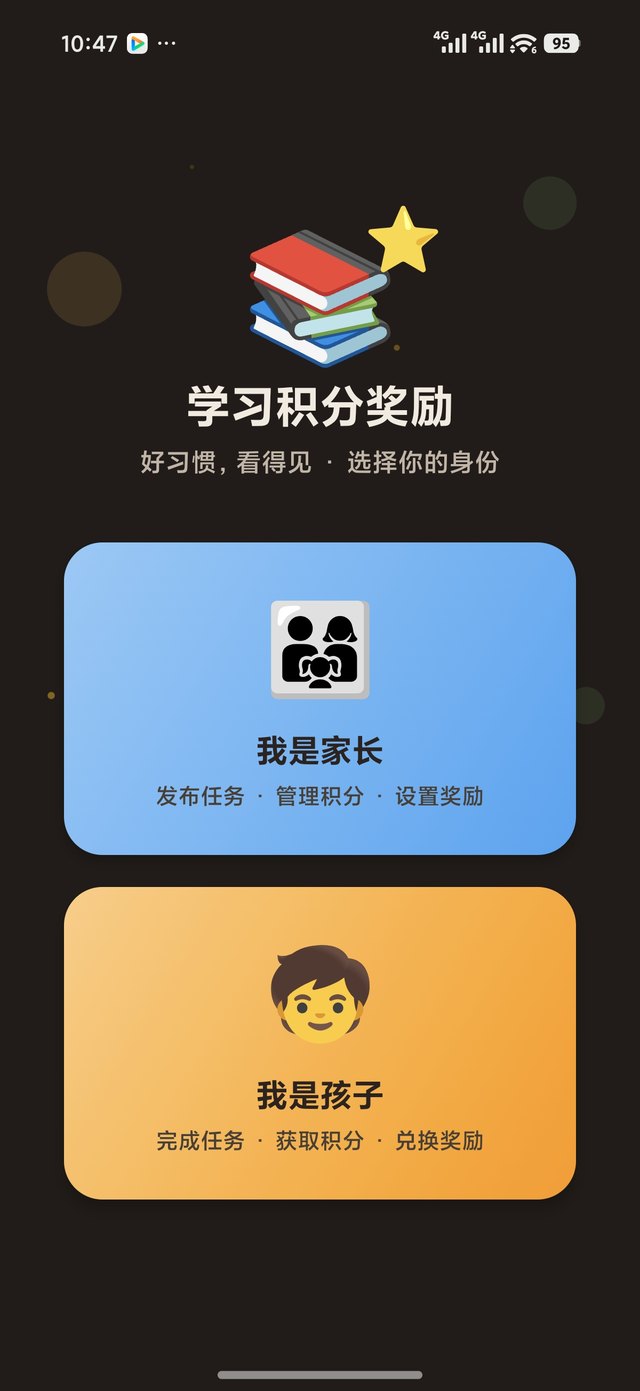
Two consequences follow from that. The first is distribution: there is no app store listing, only signed APKs and a simulator bundle on GitHub Releases. The second is the data boundary: task titles, mistake content and points history all live in the device's own database, and moving to a new phone means exporting a backup, not signing in.
Three problems it targets
Most family study apps do not fail because they lack features. They fail on trust.
The parent approves blind. The kid taps done and the points are already there. The parent finds out later that the task was never actually done. In HStudy, approval is not a formality — it is the only gate that writes to the balance.
The books drift. Points live in a single number. Change it once, reverse it once, and two weeks later nobody can explain where the balance came from. HStudy does not allow editing the number at all; the balance is always the sum of records.
Mistakes sink. The notebook fills up and never gets opened again, so the same question shows up on the next exam. Review needs scheduling, reminders and active recall, or it is just copying.
Six modules, and what each one owns
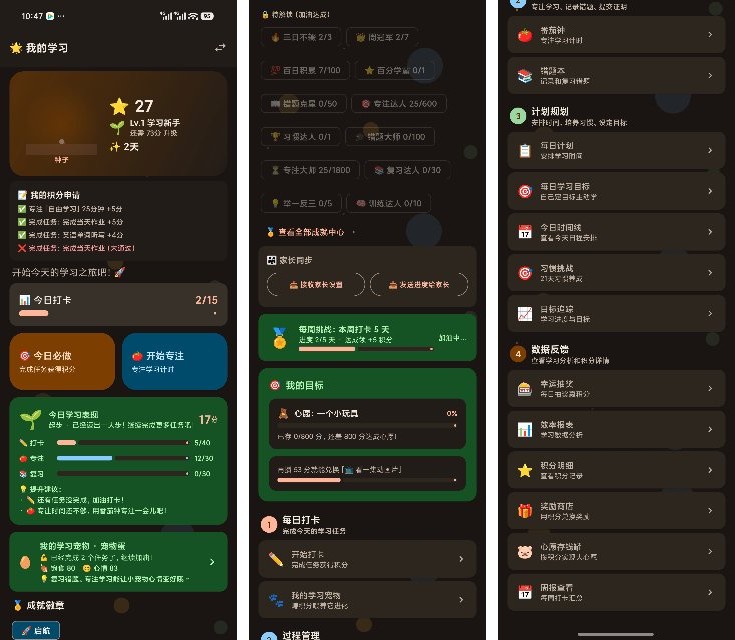
Tasks and approval. The parent creates a task with a base value and a difficulty multiplier; the child checks in when it is done. The task card shows one of five states directly: pending, posted, rejected, cancelled, revoked. After a rejection the child can check in again. If a parent taps approve by mistake, there is a way back — revoking appends a reversing entry rather than deleting the original.
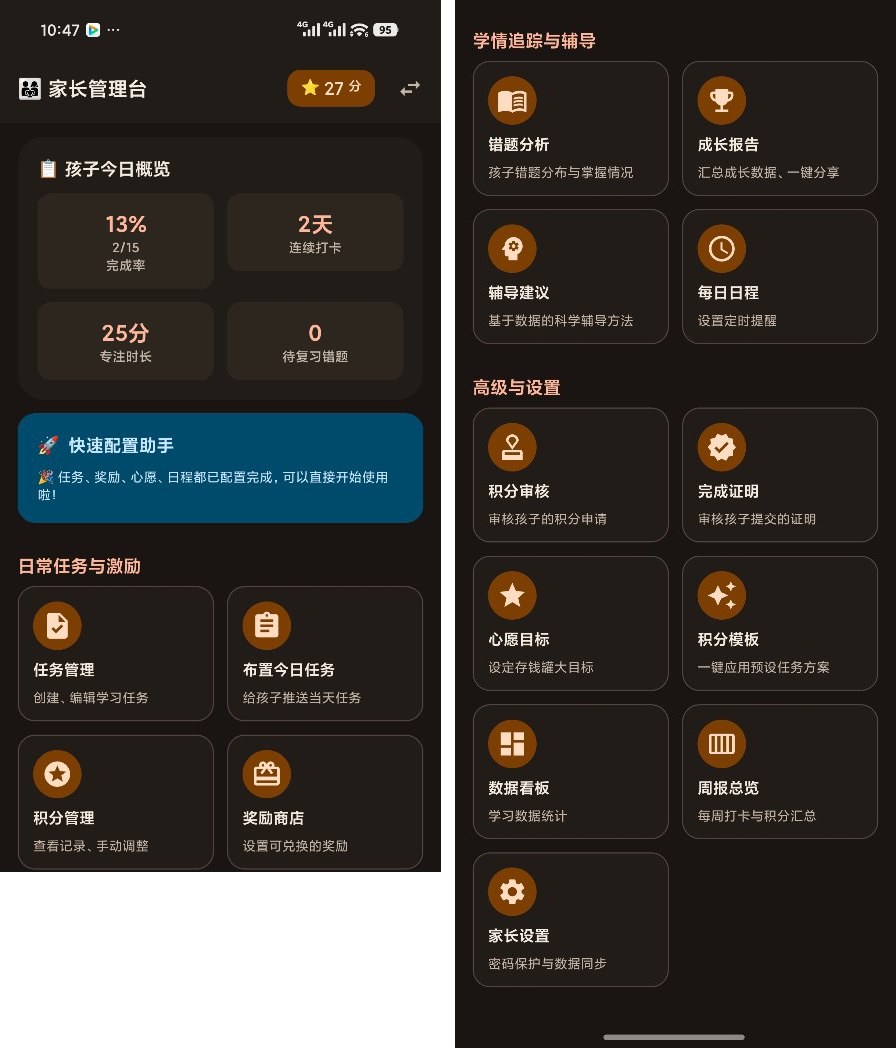
Focus. A pomodoro timer with a breathing guide and break cycles, plus a Schulte grid trainer. The hard part of a pomodoro is not counting seconds, it is interruption: switching screens, the display turning off, or the process being killed by the system all have to resolve to the right session, or the kid sat there for twenty minutes for nothing. The screen stays awake while a session runs.
Mistake review. Mistakes are tagged by subject and error cause, scheduled on spaced repetition, reminded daily, and reviewed through active recall — think first, then check. Getting it right, reviewing only, and working through a variation are worth 3, 1 and 3 points, and all of them still need parent approval.
Rewards. A daily lucky draw, pet care, a wish-goal savings jar, a reward store, achievement badges. Deposits and refunds both run through the same points ledger, so deleting a wish returns whatever was saved instead of vaporising it.
Reports. A weekly learning report, a focus efficiency report and a growth report put check-in counts, focus time and review volume side by side, instead of handing parents a single total.
Family coordination. Assign tasks, build schedules with alarm reminders, run 21-day habit challenges and daily goals. Two devices can pair over the local network, and parent configuration can be exported, imported, backed up and restored.
The ledger: five invariants
This part is easy to underestimate. There is no balance field that can be written directly — only an append-only record, with the balance summed from it. Five rules hold the whole thing together:
A check-in earns nothing. It writes a completion record and a pending request, and never touches the balance. That sounds obvious, but in an early version three paths — habit check-ins, assigned tasks and daily goals — called the award function straight through, bypassing approval entirely.
One effective request per unit of work. A business key ("task 12 on November 22") allows at most one pending and at most one approved request at a time.
Approval is idempotent. Only a pending request can flip to approved and score. Tapping approve twice does not award twice, which matters when the network stalls and a parent taps repeatedly.
Reversal is symmetric. Revoking something unapproved cancels it — there were never any points. Revoking something approved appends a reversing entry, and the badge flips to revoked honestly.
The ledger is append-only. Records are added, never deleted. The balance equals the sum of all records. The cost is that you cannot "just fix it for them"; the benefit is that every point traces back to an approver, a timestamp and a business key.
Four of those five rules are concurrency and idempotency problems that code review does not catch. I ran the invariants as regression tests against a real database: double approval, concurrent claims, revoke-then-check-in-again. The reasoning is simple — green tests do not mean correct logic, especially when the assertions only cover the happy path. I ran into exactly that trap while writing notes on unit tests that pass while the code is broken.
One codebase, two platforms
HStudy started as a pure Android project. Since v3.0.0 it has been Kotlin Multiplatform with Compose Multiplatform. Logic and UI both live in the shared layer — 178 Kotlin files and forty-odd screens in commonMain — while Android and iOS keep only what genuinely has to be native: notifications and alarms, camera, file sharing, device discovery.
The payoff is writing the UI once. The cost is in the corners: some notification properties cannot be assigned from Kotlin on iOS, so there is an Objective-C bridge; camera and sharing need a per-platform adapter each. Every project that claims "one codebase for both platforms" earns that claim on the trunk and pays for it in these corners.
The data layer was not rewritten. The database stayed where it was, Room schema is now at v13 with a full v1-to-v13 migration chain, upgrades keep all existing data, and a backup is taken automatically before migrating. Migrations are the part I trust least — in what Alembic's autogenerate misses, the gaps are enough to make a "successful" migration drop a column, so every schema change here ships with a verification test.
The quality gate is 302 unit tests plus dual-platform CI: Android builds and tests on an Ubuntu runner, iOS produces the simulator bundle on a macOS runner. That count is up roughly 20% since v3.3.0, which had 252.
Bilingual is not a translation layer
Chinese and English were designed in, not bolted on. Copy is split into 47 per-screen tables, and every string is a typed field — a missing English entry fails the build rather than silently falling back to Chinese at runtime. It is a clumsy choice, and cheaper than shipping a half-translated screen.
Switching language does not need a restart: the preference is stored locally and the UI recomposes. Notification titles, weekly reports and schedule reminders take their words at send time, so they follow the current language too. The system language is the default; parents can override it in settings.
One category stays untranslated: task names, mistake content and wish names that the child typed. Those display as entered.
Install and upgrade: three places it snags
Builds are on the GitHub Releases page. Android is a signed APK, about 21.7 MB at v3.3.1, supporting Android 8.0 and up — after installing, the launcher icon looks like this. Three known snags:
Signature mismatch, install refused. If a debug build or a build with a different signature is already on the device, installing over it fails — the system reports the app was not installed, and adb shows INSTALL_FAILED_UPDATE_INCOMPATIBLE. The fix is to uninstall first, which wipes data, so export a backup before you do.
Android 8.x builds in the v3.0.0–v3.2.0 range cannot upgrade directly. v3.2.1 rotated the signing key from the original v2 debug key to the current release key. On Android 9 and above the rotation lineage allows an in-place upgrade with data intact. The exception is Android 8.x devices already running v3.0.0 through v3.2.0: export a backup, uninstall, install, then restore.
iOS only runs in the simulator. What ships is an unsigned simulator bundle. Installing on a real device needs an Apple Developer Program membership and signing certificates. That is not changing any time soon, so do not expect a download-and-run experience.
Backups deserve their own line. Copying the SQLite file is not a backup — a hot copy can open cleanly and still be missing data. After a hot backup that opened fine and was 14,500 rows short, the rule here became: verify the row counts, and treat "the file exists" as nothing.
Privacy: what gets sent
HStudy uses Google Analytics for Firebase to learn which modules actually get used and which get built and never touched. Parent settings has a "Share usage data" switch, on by default. Turning it off stops reporting immediately, stays off across restarts, and nothing collected while it was off gets sent later.
What is sent: screen route names, feature-usage counts, whether a reminder was scheduled, language changes, backup exports, pairing completion, plus the SDK-provided device model, OS version, country and timezone. What is never sent: names, task titles, mistake content, point values, study durations, device names, pairing codes, or any free text.
One thing worth stating plainly: Firebase assigns a stable pseudonymous identifier, and it links events from the same device across sessions. "Anonymous" here means pseudonymous, not unlinkable. If that is a hard requirement for you, turn the switch off — nothing in the app stops working.
Who it suits
Parents who want a study tool that works offline, with the data on their own phone. Families already running a paper points chart or a spreadsheet whose books have started to drift. Developers curious how far Kotlin Multiplatform holds up in a real project.
It is probably not a fit if you need real-time cloud sync across devices, or multiple parent accounts collaborating — HStudy is a local database, LAN pairing and file backup, with no account system. Nor is it for anyone who wants a one-tap install from an app store.
Questions people ask
Q: Can a kid edit their own points? There is no direct-edit entry point. Every award goes through an approval record, and the balance is summed. Parents can also revoke a mistaken approval from the approval history.
Q: How do I move to a new phone? Export a full backup and import it. Android system backup works too, but because of the signing rotation, exporting manually before a cross-major-version move is the safer route.
Q: Does it work without a network? All core features are local — check-ins, approvals, focus, mistakes and rewards need no connection. Only analytics reporting uses the network, and that can be switched off.
Q: How many devices? LAN pairing plus a backup file, which suits two devices in one household. It is not multi-device cloud sync.
Q: Will it cost anything? It is free, with no in-app purchases and no paywall. The author accepts GitHub Sponsors support, entirely optional.
Last thing
HStudy does not solve "how do I get my kid to study more". It solves "how do we actually deliver the reward we agreed on" — a smaller problem that, once it turns into an argument, takes the whole incentive system down with it. So the design went the clumsy way: points cannot be edited, and everything leaves a record.
Source, builds and the full version history are on github.com/yaohehe/hstudy; the v3.3.1 APK and iOS simulator bundle are on the Releases page. Every change in that history records why it was made and what it traded away. This article contains no affiliate links.
👉 Join Xiaomi MiMo Platform: Leading AI model platform with cost-effective inference
👉 Join Aliyun AI: Top AI products with exclusive coupons for business innovation
📌 This article was AI-assisted generated and human-reviewed | TechPassive — An AI-driven content testing site focused on real tool reviews
🔗 Recommended Tools
These are carefully selected tools. Using our affiliate links supports us to keep producing quality content:
As an Amazon Associate, I earn from qualifying purchases at no extra cost to you.