Mic Boom Arms: Four Numbers That Decide If One Fits
I checked the product listings and brand pages for six microphone boom arms, pulling four numbers from each: desk clamp thickness, load rating, reach and mic thread. Those numbers decide whether the arm fits your desk and your microphone long before the brand name does. I found the two sources disagree on one model, which is worth reading before you order. My export geo shows CNY pricing that shifts by region, so this post does not quote Amazon prices; every spec has a named source and the checkout page is authoritative on the day you buy. This post contains affiliate links, and I may earn a commission if you buy through them.
The short version
TL;DR: measure the desk before you buy. RØDE PSA1+ lists a 70 mm clamp and 0.25-1.2 kg load, while RØDE's own site says 94 g to 1.2 kg, so the two sources disagree; Elgato Wave Mic Arm LP gives 740 mm reach and magnetic cable covers; the newer Wave Arm MK.2 adds a riser so the mic can clear a tall monitor; Shure SH-BROADCAST2 states 4.4 lb capacity and 33 in reach; Gator GFWMICBCBM2500 clamps to 55 mm but adds a limited lifetime warranty; budget pick InnoGear claims 1.5 kg capacity and a 2 in clamp.
Clamp thickness: the number that sends arms back
Clamp thickness is the easiest number to skip and the easiest to return a product over. The listings are far apart: PSA1+ clamps to desks up to 70 mm, Gator's low-profile arm says 2.17 in (55 mm), InnoGear says 2 in (about 51 mm) and explicitly requires a flat, unsloped edge. Both Elgato arms emphasise a padded clamp for tight spaces in their bullet points but do not put a millimetre limit there, so check the specification table before ordering.
The fix takes a ruler. Measure the desk exactly where the clamp will sit, not the leg or a decorative trim strip. The most common return reason I see is a desk that turns out to be too thick to grip, and a rounded edge is worse than the number suggests: a clamp needs a flat surface, and a rounded lip can leave it one millimetre short of biting.
Load rating: weigh the mic and the shock mount together
The second number is load, and the unit is the microphone plus its shock mount, not the bare mic. RØDE's own PSA1+ page says it works with microphones or shock mounts from 94 g to 1.2 kg and names the PodMic, Procaster and Broadcaster; the listing for the same arm says 0.25 kg to 1.2 kg. Both texts were still live when I checked. This is less a contradiction than two baselines: the brand counts the light NT-USB Mini, the listing counts a typical dynamic mic. If yours weighs less than 250 g, the brand page is the safer reference.
Shure SH-BROADCAST2 puts 4.4 lb (about 2 kg) in the product title, the highest stated figure in this group; InnoGear claims 3.3 lb (1.5 kg). If you use a heavy microphone such as the SM7B, my earlier dynamic microphone XLR and USB guide lists body weights you can add before comparing them with these ratings.
An overloaded arm rarely drops the mic. It drifts downward slowly, moving the capsule away from your mouth and shrinking your level over a take. That gets misdiagnosed as a loose spring when it is really a weight problem.
Reach and posture: low profile is not always right
The third number is reach, but the real choice is posture. Elgato's Wave Mic Arm LP lists 740 mm (29.1 in) of horizontal reach, all-metal anti-torsion construction and magnetic covers over the cable channels, with the arm sitting below shoulder level so it stays out of frame. Gator states 33 in (84 cm) extension and 90 degrees of vertical movement; Shure states 33 in reach, 360 degrees horizontal and 90 degrees vertical.
The newer Wave Arm MK.2 says something different: its riser lets the mic rise above a tall monitor or stay low, so a low-profile arm can be the wrong answer if you shoot in front of a large upright display. Framing is not only about the arm, either, and my video-call lighting guide breaks down what else blocks a shot.
Threads and cable routing: two free fixes
The fourth number is the thread. The US 5/8 in-27 and European 3/8 in-16 standards are different, and losing the adapter means waiting for a replacement. PSA1+ ships both thread adapters; Gator states compatibility with 5/8-27 and 3/8-16; Elgato's Wave Arm LP ships 1/4-to-3/8 and 1/4-to-5/8 adapters and lists all three sizes in its thread field; Shure's specification table lists 5/8 in only, so a European microphone needs a separate ring.
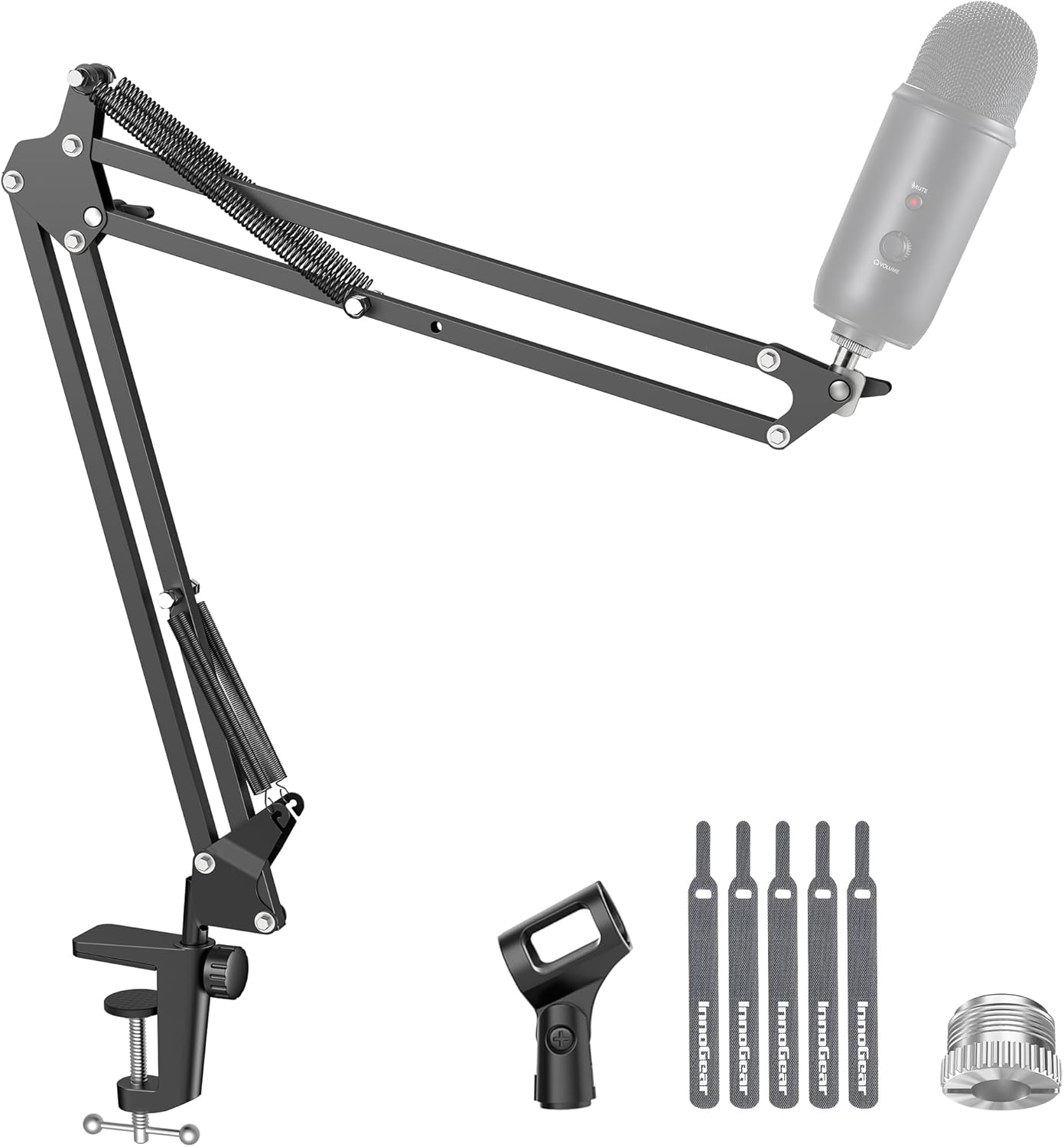
Cable routing decides whether your desk looks tidy and whether a joint eventually pinches the cable. PSA1+, both Elgato arms and Gator use covered channels with magnetic lids; InnoGear uses an exposed spring arm where you tie the cable on yourself. An XLR cable is stiffer than USB, so a closed channel earns its keep. My dynamic versus condenser comparison also covers how much wiring each path needs.
RØDE PSA1+: damping is the feature, the spec baseline needs checking
The listing is here. RØDE's page calls out internal spring damping so you can move the mic mid-take without creaks, and bundles both a padded desk clamp and a threaded desk mount; 360-degree rotation and integrated cable management are also on the brand page. Two real drawbacks: the load floor differs between brand and listing (94 g versus 0.25 kg), and the clamp stops at 70 mm, so measure a thick desk first. Price is whatever the listing shows on the day you buy.


Elgato Wave Mic Arm LP: low profile with magnetic covers
The low-profile listing is here. Its 740 mm reach, anti-torsion metal build, magnetic cable covers, 360-degree horizontal and 90-degree upward vertical rotation all appear on the listing; the box contains 1/4-to-3/8 and 1/4-to-5/8 adapters rather than a direct 5/8 female thread. Drawbacks: vertical travel is specified as upward only, so check the joint if you need to swing the mic up from below, and the clamp limit is absent from the bullet points. Price is whatever the listing shows on the day you buy.


Elgato Wave Arm MK.2: a riser for monitor clearance
See the listing: the title itself says it rises above tall monitors or stays low, and the box includes a riser extension, padded clamp and 3/8 and 5/8 adapters. The trade for posture flexibility is more parts than the LP, and the listing gives no load rating, so do not infer heavy-mic capability from the newer model number. Price is whatever the listing shows on the day you buy.


Shure SH-BROADCAST2: the clearest load rating
The Shure listing is here, and its title states 33 in reach, 360-degree horizontal and 90-degree vertical adjustment, clamp or direct desk mounting, magnetic cable channels and 4.4 lb capacity, the most explicit rating in this group. Its drawback is the specification table listing 5/8 in only, plus an "About this item" block that contains one sentence, pushing the useful detail into the title and spec table. Price is whatever the listing shows on the day you buy.


Gator GFWMICBCBM2500: clamp limit stated, warranty is the strength
The low-profile Gator listing is here: a 2.17 in (55 mm) clamp limit, 33 in (84 cm) extension, compatibility with both 5/8-27 and 3/8-16, a magnetic cable cover and a limited lifetime warranty. Its clamp limit is 15 mm below the PSA1+, or 21% less, so measure first, and "designed and supported in the USA" does not mean every part is made there. Price is whatever the listing shows on the day you buy.


InnoGear: adequate on budget, but route the cable yourself
Its listing claims 3.3 lb (1.5 kg) capacity, a 2 in flat desk edge and a 5/8-to-3/8 adapter. The seller presents a redesigned joint as a fix for knobs that deform springs on competing cheap arms, which is a fair hint at where these fail. Drawbacks: the cable is exposed and needs ties, and the advertised 360 degrees applies to the base while the arm itself moves 135 degrees back and forth and 180 degrees up and down. Price is whatever the listing shows on the day you buy.

Troubleshooting: what actually goes wrong
- The clamp cannot bite and the desk wobbles: measure the desk where the clamp touches it and compare with the 70 / 55 / 51 mm tiers. A rounded edge slips even at the stated thickness; use a flat area or a desk-mounting plate
- The arm drifts down and the mic leaves your mouth: mic plus shock mount exceeds the rating. PSA1+ is 94 g-1.2 kg on the brand page but starts at 0.25 kg on the listing, so use your own lightest device as the baseline; heavy microphones belong on the 4.4 lb tier
- The thread will not screw in: 5/8-27 and 3/8-16 are different standards, and Elgato adds 1/4 adapters. Check the direction of the supplied adapter, male-to-female or the reverse, rather than trusting "fits most microphones"
- An XLR cable gets pinched at a joint: covered magnetic channels avoid it; on exposed spring arms, leave slack along the arm and never tension the moving end
- You hear creaks during a take: cheap springs and knobs are the usual source. Spring damping is a specific claim on the PSA1+ listing, not a synonym for every "silent" badge
Where this stops
Everything here comes from a 2026-11-21 check of a brand page (RØDE's PSA1+ specification page) and six Amazon listings, not from months of mounting microphones and watching for fatigue. My export geo resolves to China and shows CNY pricing that varies a lot by region, so prices are deliberately omitted; stock and "sold by Amazon" status also change, so recheck on order day. This round did not retrieve citable specification copy from official Elgato or Shure pages, so those numbers are attributed only to the listings, which is a sourcing boundary rather than official confirmation. Stated reach, load and clamp figures come from manufacturers; desk strength, thread tolerance and cable stiffness still shape the result after installation.
FAQ
Q: My desk is 60 mm thick. Which of these fit?
The PSA1+ listing says 70 mm, so it fits; Gator at 55 mm and InnoGear at roughly 51 mm do not. Neither Elgato arm states a limit in its bullet points, so check the specification table first. PSA1+ also ships a threaded desk mount, which bypasses the clamp altogether if you can drill the desk.
Q: Which arm handles a heavy microphone like the SM7B?
On paper the Shure SH-BROADCAST2 at 4.4 lb (about 2 kg) is highest, followed by InnoGear at 1.5 kg and PSA1+ at a 1.2 kg brand limit. Add the shock mount weight to the microphone before comparing. The MK.2 listing gives no capacity figure, so do not judge it by appearance.
Q: Should I buy a 5/8-27 or a 3/8-16 thread?
Neither, until you look at your microphone or shock mount: those are US and European standards. RØDE and Gator supply both adapters, Elgato supplies 1/4-based adapters, and Shure lists 5/8 only. Adapters are cheap, but a missing one stops a recording session.
Q: Low profile or riser?
For a camera-facing stream, a tight desk and a short monitor, pick low profile: Wave LP, Gator or Shure. For an upright monitor or a mic coming down from above, pick a posture-flexible arm such as the MK.2. The deciding question is what blocks your frame, not which one costs less.
Last word
A microphone boom arm is not a "clip it anywhere" accessory: clamp thickness decides whether it fits, load rating decides whether it slowly droops, reach and posture decide whether it blocks the shot, and the thread decides whether you can record on day one. All four figures are on a listing or a brand page, and ten minutes of checking before ordering beats a return afterwards. For the microphone itself, see my dynamic microphone and dynamic-versus-condenser guides; this post only covers hanging it securely.
👉 Join Xiaomi MiMo Platform: Leading AI model platform with cost-effective inference
👉 Join Aliyun AI: Top AI products with exclusive coupons for business innovation
📌 This article was AI-assisted generated and human-reviewed | TechPassive — An AI-driven content testing site focused on real tool reviews
🔗 Recommended Tools
These are carefully selected tools. Using our affiliate links supports us to keep producing quality content:
As an Amazon Associate, I earn from qualifying purchases at no extra cost to you.